Showing posts with label animation. Show all posts

3D Anamorphic Pencil Vs Camera Comprehensive Tutorial (Tuts+)

via Tuts+

In this tutorial, you'll learn how to do a large 3D anamorphic drawing. The theme and message I want to express is "choose peace, not violence", so I decided to oppose a dove and a revolver as the main subject of the artwork. What we want is to have some sketches large enough to pose with them and become part of the whole composition.

By the end of this tutorial, you'll understand my work flow from the first studies through to the final work. I'm also going to teach you all kinds of graphic tricks to help you work faster and draw difficult shapes such as guns and hands.

1. Work on the Concept

The image used for this tutorial is part of my "Pencil Vs Camera" series, a creative concept that is evolving constantly. It started in 2010 with minimalist sketches and photos. In 2011, I started making colored sketches on black paper and in 2013-2014 I decided to do the large drawings we're talking about now.

Step 1

Be inspired and inspiring. Think of an idea or a strong message you really wish to express in the creation you're about to do. It's not the easiest part, but if you want your artwork to be seen as unique and attractive by others, you should really try to express something big. Personally, I think nice ideas come through living intense moments. But if you lack inspiration, you can travel, go to exhibitions, watch films, read books, or try new things. Ideas will come to you eventually.

Step 2

Discover and save your ideas. Wherever you go, take a notebook or a sketchbook with you. Each time you have an idea or feel inspired, put it down on paper. Whether in words or sketches, just keep some traces of your ideas. They might be useful later on. When you're back home, use your sketches and words to outline the message you're trying to convey. Do some quick studies to develop the direction you'll go with your idea. Also think about the creative tools and materials you'll need, the amount of work it will require, and other logistics.

2. Use References When Needed

The composition we want to do has several elements that are not easy to draw, including the hand and the gun. Using your own knowledge may not be sufficient for a fully accurate representation of these objects. You might then consider using references. It is better to use your own references to make sure the final work is 100% original. You'll then be able to build a completely new image that will help you do the giant sketch later.

Step 1

Gather all the images you need, either using your personal references (pictures of objects you have at home for instance), or creating images to use. I my case, I had made tons of gun sketches recently, seen in different perspectives from different angles. These were personal studies, so I had a lot of material to work with.


Step 2

Drawing a gun from scratch can be difficult if you're not used to it. You must really think first about the angle you want the gun to be seen from, and do a quick sketch using basic geometric shapes such as simple cylinders, cubes, spheres and cuboids.


Ben Heine Pencil Vs Camera Tutorial - 2014

Lion Walk Animation


Another recent hand drawn animation (I drew each frame one by one, there are about 3,000 frames in total). I made this animation in a rather minimalist way. It's meant to be a simple video clip for my music (original musical composition as well) You can watch the above video in HD at this link (via Facebook) and view photos of the sketches and music in progress here below (26 pictures)...

Lion Walk Animation - Work in Progress © 2013 Ben Heine
Lion Walk Animation - Sketch in Progress © Ben Heine

Lion Walk Animation - Work in Progress © 2013 Ben Heine
Lion Walk Animation - Sketch in Progress © Ben Heine

Lion Walk Animation - Sketch in Progress © Ben Heine

Lion Walk Animation - Work in Progress © 2013 Ben Heine
Lion Walk Animation - Sketch in Progress © Ben Heine

Ben Heine editing a track in Ableton Live - Lion Walk Animation - Music in Progress © 2013 Ben Heine
Lion Walk Animation - Music in Progress © Ben Heine

Lion Walk Animation - Drawing in Progress © 2013 Ben Heine
Lion Walk Animation - Sketch in Progress © Ben Heine

Ben Heine Studio - Lion Walk Animation Intro - 2013 - Drawing
Lion Walk Animation - Sketch in Progress © Ben Heine

Ben Heine Studio - Lion Walk Animation Intro - 2013 - Drawing
Lion Walk Animation - Sketch in Progress © Ben Heine

Ben Heine Studio - Lion Walk Animation Intro - 2013 - Drawing
Lion Walk Animation - Sketch in Progress © Ben Heine

Time Warp Animation


One of my new projects. I drew each frame one by one (really time consuming). I made the animation in a minimalist way on purpose, It's meant to be an illustration for my music. I created the music and sound effects from A to Z using synths, my new Roland drum kit and Ableton Live. I'll post another short animation soon and I might do some time-lapse projects as well in the near future. Thanks for watching!

Time Warp Animation frames by Ben Heine - 2013
Gun rotation sketches for Time Warp Animation
Time Warp Animation frames by Ben Heine - 2013
Some frames in "Time Warp" (1500 frames in total)
.


Here is a video featuring some 18 Pencil Vs Camera images in progress with a small animation at the beginning (and at the end) and an original/experimental musical composition which I made in Ableton Live (titled “Haha”).

.


Some photo editing examples from my own photography portfolio. I also made the music (titled "Whistlers") in Ableton Live (experimental). This video is featuring the "before" and "after" versions of some 70 of my photos. These are mainly the most viewed pictures from my Flickr and DeviantArt stream and I've never shown the initial images previously. I think this vid could be interesting for young photographers willing to learn some photo editing possibilities...

Presage
.


A small animation I made for this melody titled "Presage", which I finished some weeks ago (just playing around, still training). I took the initial picture in Brussels, Belgium and I created the music in Ableton Live.

(See it on DeviantArt)

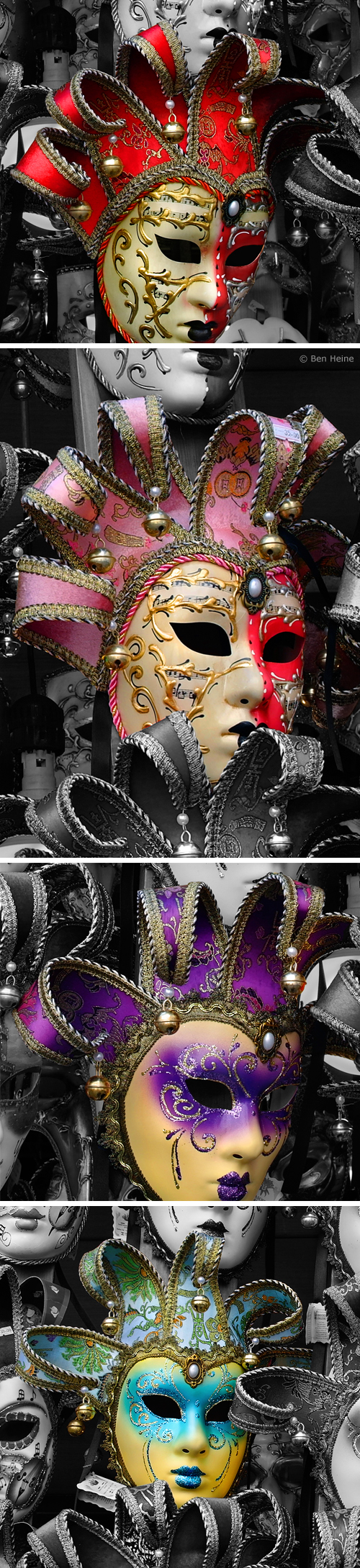
"All the world's a stage and all the men and women merely players" (Shakespeare). A picture I took in Venice, Italy. Please also see this little animated gif with each colored mask.

Some details:


© 2011 - Ben Heine
Kiwi!
.

.
Simply brilliant, a must see!
www.donysanimation.com
(Music by Tim Cassell)
Reblog this post [with Zemanta]
Animation Project
.
.
The idea is : If you play Lotto, you become happy with material wealth, if not, then it's the opposite... Very commercial and simple...
.
Below is the storyboard I came up with :
.


.
I hope to be able to post this animation when it's ready...
.